• Skip to main content

Brad Roark

Web Strategy Enthusiast

Websites

May 13 2014

How Do I Create A Website?

© medithit's flickr creative commons
© medithit’s flickr creative commons

It is not as impossible as you might think.

You can read about keys to a great website or is your website built right later but lets get started on building you a website. I will take you from A-Z and provide links that will help get you going.

Step 1 You can either decide on a domain name or setup your hosting first. Your choice, but you need both and I suggest never using the same company to both buy your domain and also host your website.

Domain name-This is what your website address will be.
For example: bestlexingtoncarwash.com or bestlexingtondentist.com -this is what your domain name is and I prefer using Godaddy.

Every website needs a hosting provider. Basically, you buy the domain name you want then you pay a hosting provider so your website is made live on the internet. I prefer Hostgator but there are numerous ones to choose from. Hostgator is very popular and I have nothing but great experiences using them.

So you have your domain and your hosting now what?

1. Log in to your Godaddy account and under Domains > Domain Management you will see your newly purchased domain.

2. When you click on your domain inside your Godaddy account you will see a page like the image below.
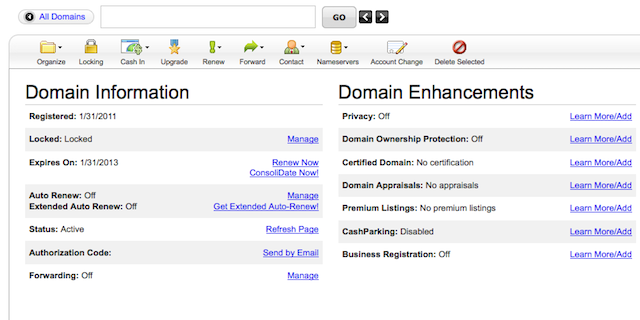
domain

3. There will be a whole bunch of options, confusing things but just concern yourself with the button that says Nameservers.

4. Sign in to your Hostgator account which can be accessed by typing in your domainname.com/cpanel. Replace domainname with what your actual domain name is.

5. Scroll down the Hostgator cpanel and on the left hand side you will see information that says Nameservers. Probably something like ns2020.hostgator.com and below that will be ns2021.hostgator.com. Both are made up but your nameservers will be close to the same format.

6. Go back to Godaddy and click on the nameservers > set nameservers. Take your hostgator nameservers and add them to your nameservers replacing any default info you may see. You need to add both nameservers and click on I have specific nameservers for my domains. this will tell Godaddy to point your domain in the direction of Hostgator.

7. Go back to your Hostgator account and the image below resembles what you see in your cpanel. Just click on add on domain under the domain section.
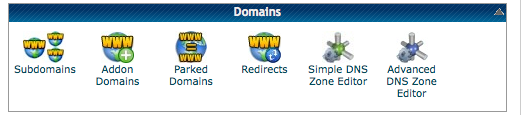
hostgator add on domain

8. Once you have clicked on addon domain you will see a page like the image below.
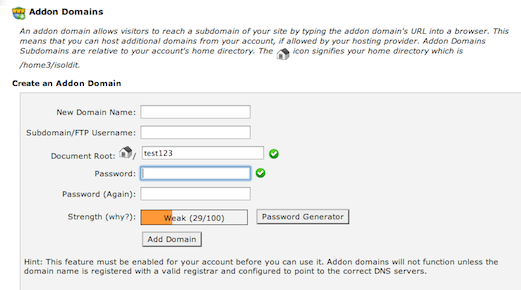
add on domain9. The default stuff will be there so just concern yourself with the New Domain Name space and password. Once this is set click add domain and your good to go!

Set back take a deep breath, you now have a live website domain name. Take it all in as you have just completed something most small business owners can’t do. It may take hours for all the Internet servers across the world to see your website address but its there even though it’s still empty at this point.

Now for the fun part

I’m assuming you have Hostgator hosting for the instructions below but all cpanel logins should be just about the same.

You have your domain setup with hosting but you have a blank page. First, decide on the basics.

1. Make a list of your information you want on your website -pages for example that are Home, Contact Us, About Us, Products or whatever you want.
2. You will need content but that’s where your creativity comes in.
3. You have a couple options like HTML templates or WordPress.

I suggest WordPress since this could be your first time setting up a website.

But you can find HTML templates everywhere including right on Hostgator. HTML is a coding language that you learn but templates help you basically plug and play your way to building your website. Both HTML and WordPress have advantages and disadvantages, BUT adding content or changing content in WordPress couldn’t be easier.

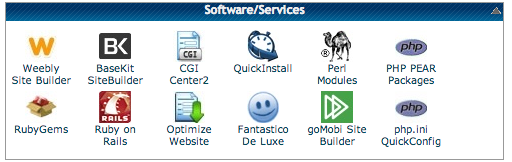
On the Hostgator dashboard there will be selections like this.
host2

Fantastico11. Log back into your Hostgator account and find Fantastico De Luxe under Software/ Services. When you click on Fantastico it will take you to a page that has whole bunch of info but just look on the left and click on WordPress.

2. The next page will have choices like New installation. Simply click on new installation and setup your new WordPress installation. Don’t worry about the Install in directory -thats for more advanced stuff so leave it blank.

3. Be sure to add a user name and password under Admin access.

4. Choose a nickname and fill in your email. Your site name and description can be changed once your into your WordPress.

5. Once you click install your almost done. Once you get the successful setup screen you should be able to use your login and password you created to access the Worpdress dashboard.

You now have a website with a domain name and the default WordPress theme on your homepage. WordPress is customizable in almost every way so play with it and learn.

Happy website building!

Written by Brad Roark · Categorized: Websites

Mar 24 2012

Social Media Is The New Networking Medium

Is social media good for your business? Really?

Good grief, not another thing you have to learn about and try to figure out when you’ve already got so much going on with your small business?!

Yet social media really is something you should give heavy consideration to using because social media can be really good for your business.

Here are just 7 of the reasons why:

1. You can give instant killer support. Turn your occasional unhappy customers into raving fans by dealing with them directly, quickly, and in a satisfactory manner.

2. It offers ways to get your name out there and keep your name out there. Don’t get forgotten or left behind; offer discounts or limited-time offers or whatever works for your particular company. It’s all about branding.

3. Social media also offers you a chance to show a bit of the face behind the brand. This means a lot to people.

4. It’s another way to be found – you might not be found on the first page of a Google search if you’re a little guy competing against the big guys, but you can be seen when you use social media.

5. Social media gives you targeted traffic. The ones who stick around are the ones interested in your product and company.

6. Consider social media a much less expensive way to advertise/market!

7. It allows your customers a chance to communicate with you using their preferred method. Conversations are real and valuable.

If you need help setting up a Facebook fan page or want to know the social media do’s and don’ts, I’d be happy to help. Please contact me with your needs and let’s get you benefiting from social media as soon as possible!

Written by Brad Roark · Categorized: Websites · Tagged: Social Media

Mar 17 2012

Do You Need A Sales Army Based On Their Performance?

How to have a sales army to sell your products or services

If your business is a small one and you wear most, if not all, the hats then the title of this email must sound odd to you. You’re probably wondering how you’d be able to afford to hire a sales army.

There really is a win-win situation here.

You simply set up an affiliate program and allow others to sell your products for you. You pay them a commission, often 50% but it could be whatever percentage you want, when they make sales.

Otherwise, you pay them nothing. They are not employees so you don’t have to worry about payroll, insurance, vacation pay, sick pay, etc. Yet they will work hard to sell your products because it means money to them when they make sales.

Yes, your earnings will be less than when you sell the product yourself, but to be honest, you can only reach a fraction of the market by yourself.

That’s why I call affiliates a sales army. Just imagine the potential if *each one* of the affiliate reaches as many customers as you could? I think I hear the ca-ching of many cash registers!

There are step-by-step instructions floating around the web, some with great info and others that leave out crucial pieces, about how to set up an affiliate program.

It will require an affiliate software program (I’ve got recommendations) and some “tools” for your affiliates to use. Sound interesting? I can explain it better when you contact me.

Written by Brad Roark · Categorized: Websites · Tagged: Lexington

Mar 10 2012

Graphics Can Cost You Sales

Graphics mistakes that will lose you business

So you’ve finally taken the plunge and put a website up. Congratulations, it’s a wise move!

“What? You did it yourself?

“Let me take a look… oh… ummm…”

Does your website scream amateur? It might be that you did put your site together yourself or you got your cousin, Charlie, who knows a little more than you do, to put it up for you.

Now cast a critical eye over it, as if you were your customer. While you may be proud of your new-found graphic skills, you may actually be scaring potential customers away.

Simply put, a professional website header and other graphics make your online business face professional by association.

If your graphics look, well… lame, then everything else is suspect too, even if you do have valuable information on your site.

A site’s graphics are so important, but often overlooked. If you’ve gone to all the work to bring new people to your website, don’t you want to leave a good first impression?

Take a look at some of the websites you like to visit and check out their website header, their “buy now” buttons, and the other graphical elements.

• Are they in keeping with the overall theme of the business?
• Are they pleasing to look at?
• Do the graphics in the content make the site easier to read?

The good news is you don’t have to be a graphics artist to have a professional-looking website! I can reveal my resources or arrange to have it done for you to save you time and hassles.

You can email or call me anytime to discuss this.

Written by Brad Roark · Categorized: Websites · Tagged: Lexington

Mar 03 2012

Do You Have An Online shopping Cart? Why Not?

Online shopping carts – boost or bane?

Here’s a bold statement – All small businesses should have a website, even if they do most of their business offline. A website may be where your next customer finds you, and with people buying more and more often online, it makes perfect sense for you to sell online too.

If you do want to offer products for sale on the Internet, then you’re going to need an online shopping cart. Choosing the right one is important because the wrong one could mean more work for you fixing problems.

It’s true, the right shopping cart can be a huge asset to your business and even increase the number of products sold to each customer when they buy. (Think Amazon and how they suggest other products you might like.)

The wrong cart can cause lost sales and mean huge headaches for you!

Here are some things to look for in a shopping cart:

1. The cart is secure and hacker-proof.
2. It can calculate shipping charges and tax.
3. The shopping cart can charge clients monthly for membership-type products.
4. It integrates with major credit card processing companies.
5. The cart can also offer customer upsells.
6. It will create a client database, which is very important.
7. The price for the shopping cart service is reasonable for what you get.

I realize how picking the right shopping cart can make a big difference to you. Give me a call and I can help you set up just the right one for your business.

Written by Brad Roark · Categorized: Websites · Tagged: Lexington

  • Page 1
  • Page 2
  • Page 3
  • Next Page »

Copyright © 2026 · Altitude Pro on Genesis Framework · WordPress · Log in